
|
|
|
|
|
Drag Function Conversion You can select from a number of drag functions (drag tables) by clicking the drag table select button shown in the red box below. A dialog box opens that lists the available drag functions (tables).
Click the drag table name you want to use and then click the OK button. If you selected a table other than G1 a message appears to remind you that G1 is the standard table. This message appears only once per session. After that a dialog box opens that gives you the choice of just using a B.C. value or converting to the selected drag function using either the equal drag or equal TOF methods.
Click the corresponding radio button to select the method you want to use. You can then edit the corresponding value if desired. Finally click OK to complete the process.
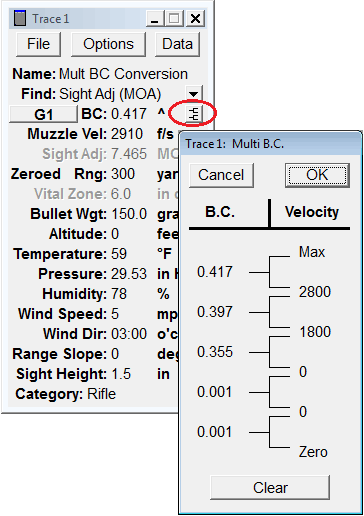
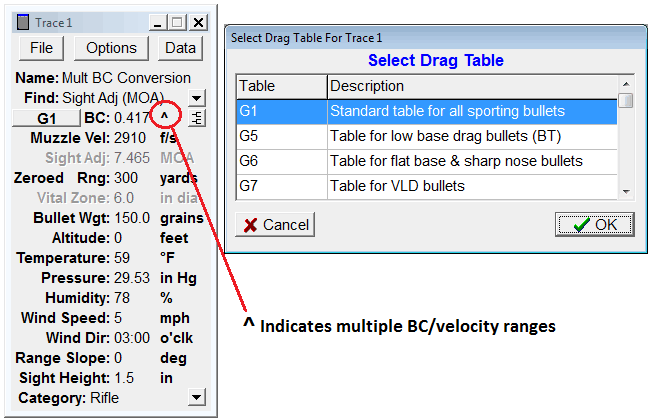
Convert Multiple Velocity Range BC To a Single BC Value You can also convert a multiple velocity range BC to a single BC value of the same or different drag function. Such multiple velocity range BC values are published by Sierra to give more accurate predictions of their bullet's downrange performance, but as a user you have the advantage of knowing the muzzle velocity of the load you are using a particular bullet in and the range over which it's to be used. With that information the program can convert the multiple velocity range BC to a single BC value such that the Time Of Flight (TOF) to the given range is the same (usually to within three significant digits). The ^ character following a BC value indicates it's a multiple velocity range BC. To view the details click the button shown in the red oval below. A dialog opens showing up to five BC values and their velocity ranges. Note that once the low velocity of a range is 0, all lower ranges are ignored.
To start the conversion click the drag table select button to the left of the BC value. This opens the 'Select Drag Table" dialog as shown below. Select the drag table (function) to convert to and then click OK.
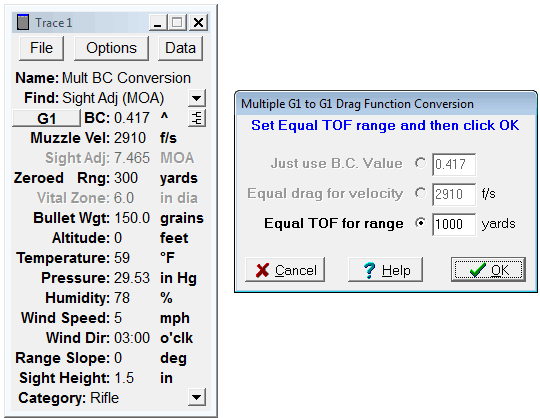
The next dialog normally gives you a choice of which drag conversion method you want to use, but when converting from a multiple BC to a single BC of the same drag function the only method that makes sense is Equal TOF for range, so the other methods are disabled. Enter the range over which you intend to use the bullet and click OK.
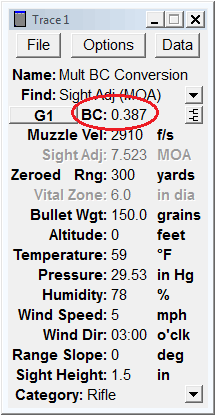
The conversion is made and the new single BC value is put into the trace as shown below in the red oval. Note the ^ character is gone indicating the new BC is a single value.
There's lots more information in Tutorial 4 about drag functions and the means of converting them. Open the Main Tutorial page to access the tutorials. |
||
|
|