On this page you'll find software we developed
either for ourselves or for other companies who are making
it available to the public for free. All programs on this
page were developed by Dexadine, Inc. All of our products
are digitally signed with our name, and thus, our reputation.
When you click to download you can either run
or save the setup file to your computer. When the setup file
is launched, Windows® 7 through Windows® 11 display
a dialog showing the software publisher's name. If it doesn't
say Dexadine, Inc. it's because the file didn't download properly.
Just download it again.
Drag
Function Synthesizer

The Drag Function Synthesizer gives shooters
the ability to visually study the drag characteristics of
Doppler radar tested bullets by synthesizing a drag function
that closely corresponds to the drag function any ballistics
calculator uses to produce its downrange data. It does
so by using well known math and methods to process the downrange
data.
That doesn't sound too interesting until you
consider Lapua, Hornady, and perhaps other ammunition and
bullet manufacturers are using Doppler radar to produce custom
drag functions for specific brands and models of bullets --
maybe bullets you use or are thinking about trying.
Lapua makes their custom drag functions available
for download and also gave us permission to distribute them
with Ballistic Explorer. Hornady uses Doppler radar to produce
custom drag functions for their own bullets as well as select
bullets from Berger, Lapua, and Sierra. Currently, those custom
drag functions only seem to be used in conjunction with Hornady's
4DOF
Calculator. However, Hornady makes it easy for shooters
to study and analyze the data produced by their 4DOF Calculator
off-line by including a "Download Spreadsheet"
button at the bottom of the Trajectory Results page. You can
easily save the results to your computer and process them
with the Drag Function Synthesizer. Here's why...
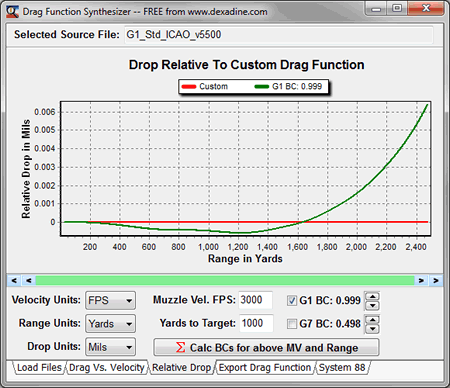
Most handheld devices and phone apps that shooters
use in the field support G1 and G7, but may not support the
custom drag function for the bullet being used. The Drag Function
Synthesizer makes it easy to determine how accurately the
G1 or G7 drag functions predict drop relative to the custom
drag function for the specific muzzle velocity and distance
you intend to shoot too. Your muzzle velocity and intended
distance is something no manufacturer knows, so you can often
improve your accuracy by using a BC specific to your needs.
If you have a copy of Ballistic Explorer
installed on your PC, you can also export drag functions for
use with Ballistic Explorer's extensive features and tools.
Click the Download button and select Run to
install the Drag Function Synthesizer to your PC. As with
all our software, the setup and program files are digitally
signed by Dexadine, Inc.

Watch these videos to learn how to
use the Drag Functions Synthesizer.
Click on image to open in YouTube


SiteLite
Ballistic Targeting System
Version 1.0.5
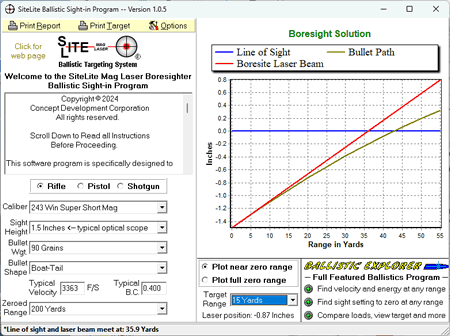
The SiteLite Ballistic Targeting System (BTS)
software works with any laser boresighter, but was specifically
designed for SiteLite laser boresighters. The BTS software
lets you select your gun, sight height, ammo, the gun's zeroed
range out to 300 yards (meters) and the distance you want
to boresight at, which can be as close as 8 yards (meters).
You can then print a boresight target customized for your
specific settings.
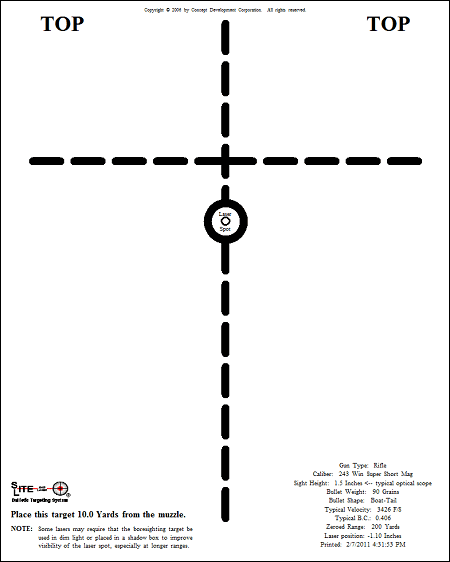
Just place the printed target downrage at the
distance you specified and center the boresighter's laser
on the spot indicated on the target and adjust the gun's scope
to align with the printed crosshair.
Laser boresigthers often come only with a generic
boresight target that approximates a typical hunting rifle
zeroed at some typical range using some typical ammo and requires
the boresight target to be placed at some specific distance
downange. Such one-size-fits-all targets likely didn't meet
the needs of many shooters and certainly don't utilize the
superior accuracy of SiteLite laser boresighters. The BTS
software changes all that by letting shooters print a boresight
target specific to their needs.
Rich Langner, President of Concept Development
Corporation offers the BTS software Free
to the public. Just go to the SiteLite
website and click on the BALLISTIC TARGETING SYSTEM
button and you'll find the download link at the bottom of
the page. If you are asked to enter your serial number you
can use 123456.
The BTS software runs on Windows® XP, Vista,
Windows® 7, 8, 8.1, 10 and Windows® 11. Both the 32 and 64
bit editions of Windows® are supported. The software is digitally
signed by Dexadine, Inc.
Tip For Advanced Users
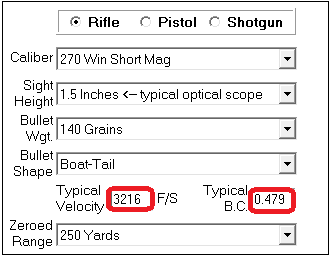
The BTS software is designed to be easy for
the average shooter to use, so the user selects the particulars
of their gun and ammo from drop down lists. The software then
looks up the typical muzzle velocity and G1 B.C. of the bullet
and displays those values, which are then used to calculate
the bullet's trajectory and produce the boresight target.
We didn't forget advanced shooters, however,
so similar software is built into Ballistic Explorer where
you can take advantage of all it's features such as finding
your load in the Ammo/Bullet
library, using the the environment you expect to be shooting
in (altitude, temperature, etc.), use any standard or custom
drag model such as G7, calibrate dual sights for tactical
weapons, and compare different zero ranges and save all your
work to a project file for each gun and/or load.
Watch these videos
for tips on boresighting.
Click on image to open in YouTube.