Ballistic Explorer gives you the tools you
need to easily find the best load, bullet, or sight-in range
for any shooting situation.
Ballistic Explorer's rapid fire interface and comprehensive
tool-set exceeds any ballistics software you'll find on a mobile
device and far outstrips those clunky page-at-a time web calculators.
Even among powerful desktop software, Ballistic Explorer stands
alone with more capability and leading edge tools so that you
can get the most out of your shooting and hunting. Explore standard
and custom drag functions to see what BC best matches your load
so that you can use your mobile software to adjust for local
conditions in the field. Print a custom target to boresight
a gun at close range that will zero at a longer range under
the conditions you expect to encounter. Ballistic Explorer makes
exploring the possibilities a snap as you plan your next range
session or hunting trip.
Ballistic Explorer™ is the finest exterior ballistics
software on the market and the only external ballistics software
you need. Whether hunting, target shooting, or competition
shooting you need to know the ballistic performance of your
factory ammo or handloads all the way to the target, and only
full featured ballistics software can give you the answers
you need.
Proven accuracy
-- Anyone can claim their software is accurate, but Ballistic
Explorer is proven accurate in real world conditions. If accurate
real world ballistics are important to you, then you should
be using Ballistic Explorer.
With Ballistic Explorer you can calculate downrange
data for virtually any load and set of conditions. Problems
that, just a generation ago, would have required the knowledge
of an expert ballistician can easily be solved by anyone using
Ballistic Explorer. Power and ease of use are the hallmark
of Ballistic Explorer.
Ballistic Explorer has been on the market since
1988, and through many versions, it has evolved from the low
resolution monochrome displays of that time to the sophisticated
Windows® interface of today. Yet many of the fundamental features
of that 1988 program are still evident in the newest version.
These features have withstood the test of time because they
are what users wanted then and still want today.
Features
Free e-mail support. The program
is of the highest quality and few customers ever need support,
but if you do, help is just an e-mail away.
Advanced aerospace derived ballistics model
for highest accuracy.
Industry standard SAAMI
drag tables. Easy conversion between drag functions using
either the equal drag at velocity or the equal TOF to range
method. Multiple BCs can be converted to single BC values
of the same or different drag function.
Supports custom drag functions. Over 50
Lapua Doppler radar derived custom drag functions are included
with Ballistic Explorer and can be used just as if they
were standard drag functions (tables). Furthermore, the
free Drag
Function Synthesizer gives you access to many more
Doppler radar derived custom drag functions for Hornady,
Berger and Sierra bullets.
Sight adjustment units in MOA, IPHY, IPHM,
CPHM, MDot (Army), or MRad (USMC). You can also add custom
units such as clicks for different scopes or iron sights.
Custom units can be defined to high precision to allow for
scopes that vary from factory specifications.
Spin Drift, Aerodynamic Jump, and Coriolis
effect easily turned on or off. When off, the corresponding
parameters are hidden to minimize distraction.
Built-in Bullet Stability and Twist Rate
Calculator make it easy to insure bullets are properly stabilized
for maximum accuracy. For any load or bullet not in our
extensive library the Bullet Length Estimator provides lengths
that are accurate to within 1/3 caliber 93 percent of the
time.
Measurements in English, Metric, or, English
with range in meters.
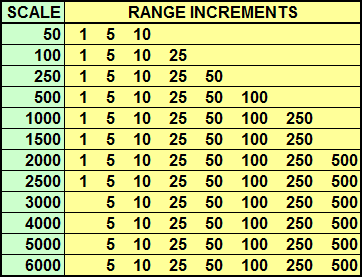
Range Scale of from 50 to 6,000 yards or
meters. Every scale up to 2,500 yards or meters can be viewed
in increments of 1, 5, and 10 yards or meters. Above 2,500
the lowest increment is 5 yards or meters. Larger increments
depend on the scale as shown in the chart:
Calculate downrange values for: velocity,
energy, drop, path (trajectory), time-of-flight, momentum,
wind drift, spin drift, aerodynamic jump, Coriolis effect,
zero adjustment, and Combined
Distance From Center.
Additional calculations include: ballistic
coefficient, muzzle velocity, maximum point blank range,
sight setting needed to zero a given load at a given range,
the zero range of a given load using a given sight setting,
bullet stability, bullet length, and free recoil energy.
CDFC, drop, path, and wind drift can be
displayed in inches or centimeters, or in the selected sight
adjustment units such as MOA.
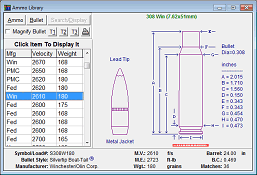
Ammo/Bullet database of over 3600 commercial
loads and 2800 commercial bullets in a unique graphical
format. Each bullet has a G1 BC value and the G7 BC value
is included if the manufacturer publishes it. This is a
true database rather than just a sorted list. Search parameters
allow you to easily find the load or bullet you want or
select a broad range of loads or bullets. Every bullet in
the database includes an outline drawing of the bullet and
every load in the database includes an outline drawing of
the case and bullet. Print preview lets you see the page
before your print, or save to a PDF file.
The Drag Analyzer lets you visualize bullet
drag versus velocity, not only for the drag function, but
also for ballistic coefficient, air density, speed of sound,
head and tail winds. This tool lets you see through the
numbers fog and understand just how standard and custom
drag functions differ and how they're similar. It's like
turning the lights on.
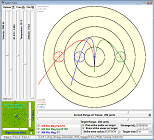
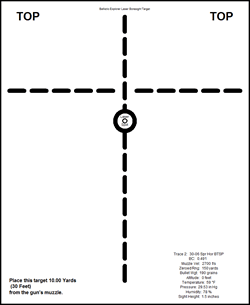
The Laser Boresight Target saves you ammo
and time zeroing your gun. You select a short range and
print a target you can use to sight-in a gun for a much
longer zero range under the conditions you expect to encounter
in the field.
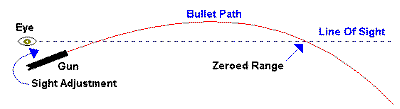
The Chart window displays the relative sight
setting change that's needed to change the zero range of
a given load from one distance to another distance. The
data is displayed in a scrollable / sizable grid, and you
can select from a number of range increments. You can also
print the chart or save it either as a tab delimited text
file or an Excel file. Print preview lets you see the page
before you print, or save to a PDF file.
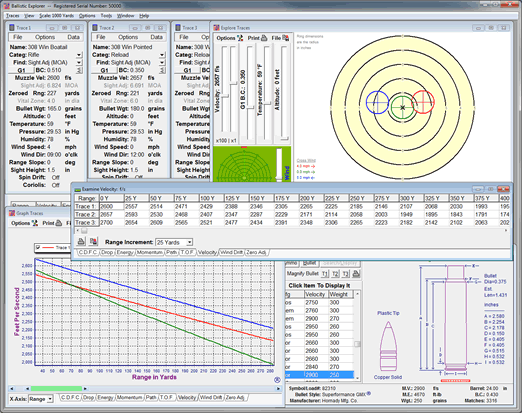
The Explore window gives you many quick
acting slider and arrow controls that work in conjunction
with rapid automatic recalculation to let you easily find
answers to shooting problems no ballistics software is specifically
programmed to solve. In addition, the Target tab shows your
bullet's strike point and accuracy area as you change inputs
and windage adjustments. Print preview lets you see the
page before you print, or save to a PDF file.
The Examine window displays any of the downrange
data for up to three loads at a time in a scrollable / sizable
grid. You can select from a number of range increments,
and you can even change the zeroed range while viewing the
data. This unique feature allows rapid experimentation with
different zeroed ranges. As with many of the program's features,
this one is a tool for exploring the possibilities and gaining
insights into the subject of exterior ballistics. You can
print the examine data or save it either as a tab delimited
text file or an Excel file. Print preview lets you see the
page before you print, or save to a PDF file.
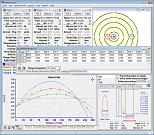
The Report window displays all the calculated
data for a given load in a scrollable / sizable grid. You
select which headings you want to display, and you can change
the order of headings by dragging and dropping. You can
also select from a number of range increments and how many
increments you want. You can print the report or save it
either as a tab delimited text file or an Excel file. Print
preview lets you see the page before you print, or save
to a PDF file.
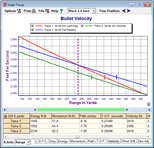
The Graph window often gives you the best
view of your data. Graph up to three loads at a time. Graph
any of the downrange data either for the full selected range,
or just a small movable span of the full range. Numerous
controls and options let you produce just the right graph.
Click on the graph to open a data grid showing the value
of each type of data for the selected range. Even graph
data relative to time of flight instead of range.
Printing: Select printer options from within
the program. Supports color printing, customized headings,
sizable margins, selectable banding, and orientation.
Trace data is easily saved to or loaded
from disk using up to 20 characters for the name and an
additional 12 characters for the category. The category
makes it easy to group loads together under your own headings,
such as "308 Reloads" or "Hi-Power". The data window feature
of each trace provides an additional 20 parameters and a
note pad for your reloading and performance data. Trace
data can be printed from the Tools menu or saved as a PDF
file.
The Project feature not only lets you save
trace data, but all open view and tool window locations
and sizes as well as most of their settings. Explore various
gun, ammo, and sight-in scenarios, and if it's something
you may want to revisit, just save it as a project file.
Easily organize your projects using descriptive file and
subfolder names; anything Windows® supports.
Check the How
To Examples section to learn more about using
Ballistic Explorer.
Summary
Ballistic Explorer is the product of original research and
development that began more than thirty years ago. Power and
ease of use have been the hallmark of Ballistic Explorer from
its early days. While competing products are still trying to
get it right, the Windows® version of Ballistic Explorer builds
on its fundamental features and goes further in fulfilling the
wants and needs of users than any other ballistics program.
Don't be fooled by imitations; Ballistic Explorer is the original
and it's the best exterior ballistics software on the market.
System Requirements
Ballistic Explorer requires a PC running Microsoft® Windows®
XP, Vista, Windows® 7, 8, 8.1, 10, or Windows® 11. Works
on either 32 or 64 bit editions. The program needs just 12 MB
of space on your hard drive. A Windows® supported printer is
needed. The program is distributed as a download from this site.
Ballistic Explorer is a trademark of Dexadine, Inc. All other products mentioned
are registered trademarks or trademarks of their respective companies.